
Download Printnanny – AI‑Powered 3D Printing Management Tool
Overview
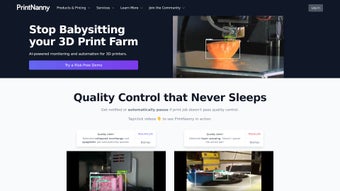
Printnanny is a cloud‑first, subscription‑based platform that brings artificial‑intelligence monitoring to every stage of the 3D‑printing workflow. Built for hobbyists, makerspaces, and industrial prototyping labs, the service connects to a Raspberry Pi (or any compatible Linux SBC) attached to your printer and streams high‑resolution video to a secure web dashboard. While a print is in progress, the AI engine analyses each captured layer, comparing it against a massive dataset of successful and failed prints.
When an anomaly such as a layer shift, under‑extrusion, or stringing is detected, Printnanny pauses the job, highlights the problem area, and sends an instant alert via email, SMS, or push notification. All job data, including time‑stamped images, temperature logs, and failure reports, are stored in the encrypted cloud, allowing you to review history, generate analytics, and fine‑tune slicer settings from any device—desktop, tablet, or smartphone. The platform also supports G‑code macro synchronization, letting advanced users inject custom commands at precise moments, such as filament changes or temperature ramps.
Whether you manage a single Prusa MK3 or a farm of industrial‑grade printers, Printnanny scales with you, offering proactive quality control that reduces material waste, shortens post‑processing, and ultimately saves money.
Features & Benefits
Core Feature List
- AI‑driven image analysis that detects layer shifts, stringing, under‑extrusion, and other common defects within seconds.
- Real‑time video streaming from Raspberry Pi or built‑in camera modules, viewable on any modern browser.
- Multi‑channel alert system (email, SMS, push) with customizable thresholds and actionable recommendations.
- G‑code macro synchronization for automated start/stop scripts, filament changes, and custom printer commands.
- Cloud‑based job history, analytics dashboards, and printable‑failure reports accessible from any device.
- Unified multi‑printer dashboard that groups devices by location, model, or project for easy oversight.
- Secure RESTful API for integration with OctoPrint, Cura, CI pipelines, and third‑party monitoring tools.
- Free 14‑day trial and tiered subscription plans for single users, teams, and enterprises.
Pros
- Significant reduction in material waste thanks to early‑failure detection.
- User‑friendly web interface that requires minimal training.
- Broad compatibility with most popular 3D printers and Raspberry Pi‑based controllers.
- Remote monitoring enables management from anywhere with an internet connection.
- Detailed analytics help continuously improve print quality and speed.
Cons
- Requires a stable internet connection for full cloud functionality.
- Subscription cost may be a hurdle for occasional hobbyists.
- Initial Raspberry Pi camera setup can be technical for beginners.
- AI model updates are server‑side, limiting offline usage.
- Advanced macro features assume some familiarity with G‑code.
Installation, Usage & Compatibility
Step‑by‑Step Installation
Begin by creating a free account on printnanny.ai. After email verification, you’ll receive a unique API key. Download the official Printnanny image and flash it onto a Raspberry Pi (or any Linux SBC) using the Etcher utility.
Connect a USB webcam or the official Pi Camera Module, then attach the Pi to the same Wi‑Fi or Ethernet network as your 3D printer. Power on the Pi; during the first boot, a setup wizard prompts you for the API key, selects your printer model, and optionally links an existing OctoPrint instance. Once registration is complete, the dashboard becomes instantly reachable at https://app.printnanny.ai.
The entire process typically takes under 30 minutes, even for users with limited Linux experience.
How to Use the Platform
After logging in, the dashboard displays a tile for each registered printer. Clicking a tile opens a live video feed, a real‑time status bar, and a timeline of the current job. To start a print, upload a G‑code file directly or pull it from integrated cloud storage services such as Google Drive or Dropbox.
As the job runs, the AI engine analyses each captured frame; if a defect is identified, the system pauses the print, highlights the problematic layer, and sends an alert with recommended corrective actions (e.g., adjust nozzle temperature or re‑level the bed). Users can also schedule recurring prints, define macro triggers for events like filament change, and export comprehensive failure reports for later analysis. The responsive UI works equally well on a desktop monitor or a mobile device, making it simple to manage a single desktop printer or a farm of twenty machines from the same interface.
Compatibility
Printnanny’s web application is browser‑agnostic and runs on Chrome, Firefox, Edge, and Safari on Windows 10/11, macOS 12+, and popular Linux distributions. The companion Raspberry Pi image supports Raspberry Pi OS (both 32‑bit and 64‑bit), Ubuntu Server, and Debian, giving you flexibility to choose the OS you prefer. For printer firmware, Printnanny works with Marlin, RepRap, and any firmware exposing a standard serial or OctoPrint API. Mobile users can monitor jobs via the responsive web UI on Android or iOS devices; a native mobile app is slated for a future release.
FAQ & Final Thoughts
Is there a free version of Printnanny?
Printnanny offers a 14‑day free trial with full access to all features. After the trial, a paid subscription is required to continue using the service.
Can Printnanny operate without an internet connection?
Core monitoring runs locally on the Raspberry Pi, but AI inference, cloud storage, and remote alerts depend on an active internet connection.
Which 3D printers are supported?
Printnanny works with any printer that can be controlled via a serial port or OctoPrint API, including popular models such as Prusa, Creality, Ultimaker, and many custom builds.
How does the AI detect print failures?
Each layer is captured as an image, which is processed by a convolutional neural network trained on thousands of successful and failed prints. The model flags anomalies when visual patterns deviate from the learned “good print” baseline.
What types of alerts can I configure?
You can receive email, SMS, or push notifications via services like Pushover, Telegram, or native mobile push. Alerts include a snapshot of the problematic layer, current print status, and suggested corrective actions.
In summary, Printnanny blends AI‑driven defect detection with a cloud‑centric management console, offering a powerful way to safeguard prints, cut waste, and gain actionable insights. Whether you’re a solo maker seeking to avoid costly failures or a production manager overseeing a printer farm, the platform’s real‑time monitoring, remote alerts, and detailed analytics make it a worthwhile investment. Ready to experience smarter, more reliable 3D printing? Start your free trial today and let Printnanny watch over every layer.
Printnanny delivers a powerful AI‑backed monitoring suite that feels at home in both hobbyist garages and industrial labs. Its strengths lie in early‑failure detection, cloud‑based analytics, and seamless Raspberry Pi integration. While a subscription cost and internet reliance may deter some, the reduction in material waste and the peace of mind from real‑time alerts justify the investment for most serious users.



.png)



